Submit your request, and our specialists will contact you shortly.
You can review the methodology and training program for "Corporate Server 2024" via the link
We regularly update our product and share the news. Subscribe to our newsletter to stay up to date with the latest developments in the R7 Office environment.



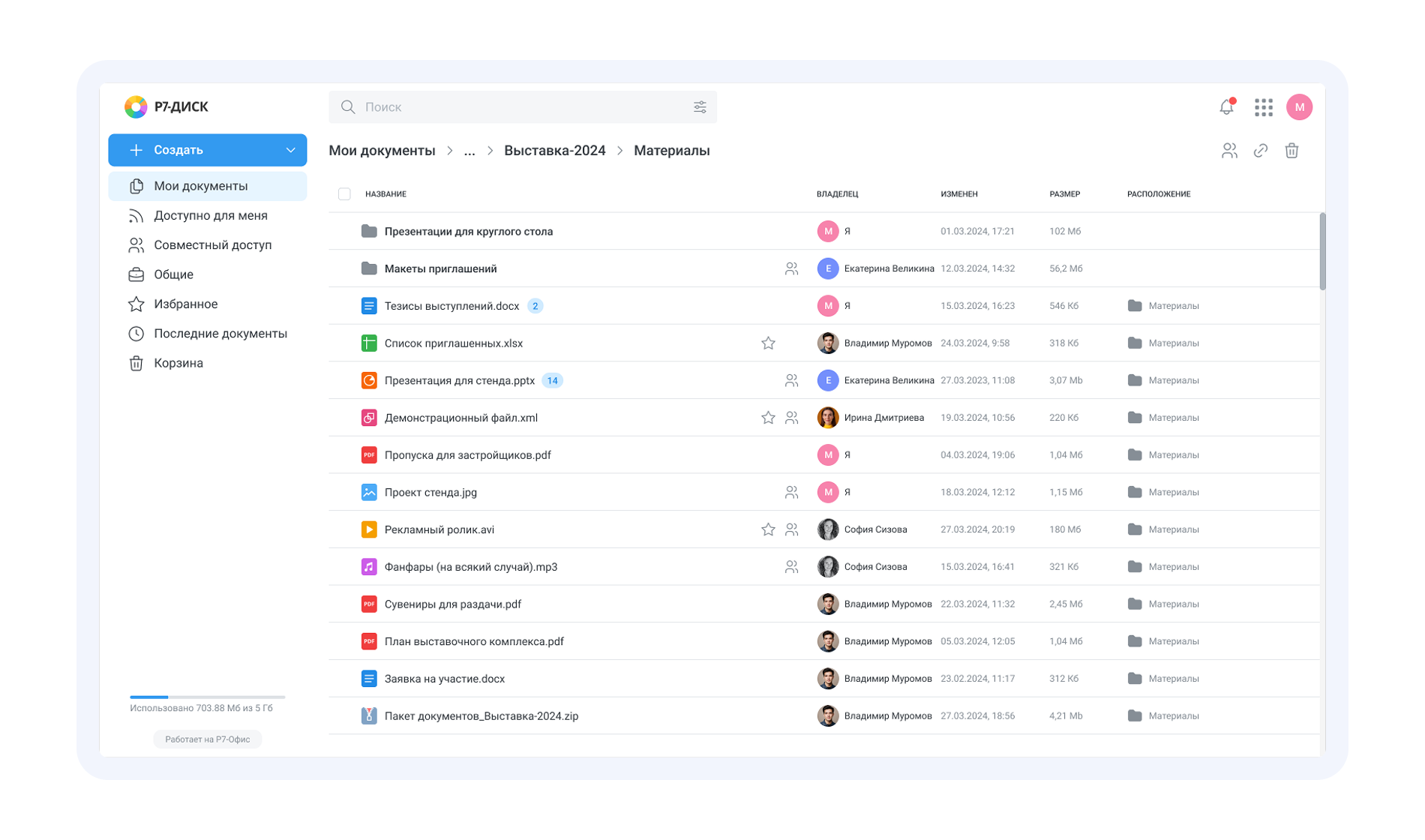
Equally comfortable on desktop, laptop, tablet, and mobile. The interface adapts to any screen size while keeping the file management experience consistent.
Preview files, work with large documents, copy, move, and run bulk operations effortlessly. Your team stays focused instead of hunting for buttons or hidden features.
Documents, spreadsheets, presentations, and diagramms open directly in Drive. Built-in editors preserve version history, permissions, and file structure speeding up approvals and reducing the risk of losing critical data.
Any file can be rolled back to a previous version: the system records the full history of edits, timestamps, and authors. This prevents conflicts, enables data recovery, and keeps final document revisions under control.
A flexible permissions system lets you grant or restrict user actions at the folder and file level. Four permission levels are available:
Upload only
Securely collect files via a single link — recipients cannot view existing content.
Comment
Access to discussions, without the ability to make edits.
Review
Users can suggest changes, but cannot approve them.
Full accessEdit, manage versions, move files, and more.
Share access to specific files or folders securely: set a password, expiration date, and allowed actions — external parties see only the data you choose to share.
Three workspace formats for different team collaboration scenarios:
Public rooms
For fast shared access, discussions, and collaborative document editing.
Private rooms
For confidential tasks and projects with a restricted set of participants.
Secret rooms (coming soon)
End-to-end encryption for maximum protection — even the administrator cannot see the contents.
A built-in search engine that delivers instant results across document content, metadata, and attributes. Fragment highlighting speeds up results analysis.
The system automatically assigns topic-based tags to documents — improving navigation, simplifying search, and reducing the burden on your team.
Administrators can restore files deleted by users, protecting data from accidental loss and human error.
Flexibly configure quotas for users, groups, and data rooms to plan resources and manage storage usage.
Files can be stored in S3-compatible storage, and mounting S3 as a folder lets you use external repositories as part of Drive.
Video and audio play directly in the browser
The built-in video and audio player handles large files without downloading, with support for streaming, fast seeking, chunked loading, and reliable playback even with heavy media files.
Work with documents, spreadsheets, and presentations directly within Drive — no downloading required. All edits are saved in version history, and comments stay in the context of the file.

Drive is deployed within a closed perimeter and fully complies with regulatory requirements and corporate information security standards.

Supports SSO, Kerberos, and SAML 2.0 authentication standards, as well as two-factor authentication. Integration with ESIA and corporate user directories is available.

The product is developed in Russia, listed in the Unified Register of Russian Software, and recommended for deployment in corporate and government environments.
Full control over data, infrastructure, and policies. Ideal for organizations with stringent security requirements.
Use the cloud version to evaluate usability, performance, collaborative editing, and integrations.
R7 solutions are used in large-scale user environments. They operate reliably at scale and handle daily peak workloads with ease.



You’ll get a hands-on look at formatting, document comparison, automation, and spell-check features applied to real-world business scenarios.
R7 Drive is an enterprise storage solution that operates within your organization’s closed perimeter — files are never transferred to external services and remain fully under your control.
Unlike Western cloud solutions, it is compatible with Russian operating systems, import-independent, and supports robust corporate security mechanisms: role-based access control, activity auditing, encryption, and data rooms for confidential collaboration.
This is not a mass-market consumer service — it’s professional infrastructure built for organizations of any size.
Yes. External participants connect via secure links with password protection, expiration dates, and restricted permissions. This lets you collaborate with contractors without giving them access to your internal corporate infrastructure.
Yes. Drive supports S3 storage and corporate directories. It also works together with the Document Server, editors, and other R7 products, forming a unified corporate stack and ensuring a seamless workflow across all services.
This website uses cookies to improve site performance, analyze traffic, and personalize content.
Technical cookies required for the website to function. These cannot be disabled.
Help us understand how you use the website so we can improve it.
Used to display relevant ads and measure campaign effectiveness.