
Submit your request, and our specialists will contact you shortly.
Submit your request, and our specialists will contact you shortly.
Submit your request, and our specialists will contact you shortly.
Submit your request, and our specialists will contact you shortly.
Submit your request, and our specialists will contact you shortly.
You can review the methodology and training program for "Corporate Server 2024" via the link
We regularly update our product and share the news. Subscribe to our newsletter to stay up to date with the latest developments in the R7 Office environment.



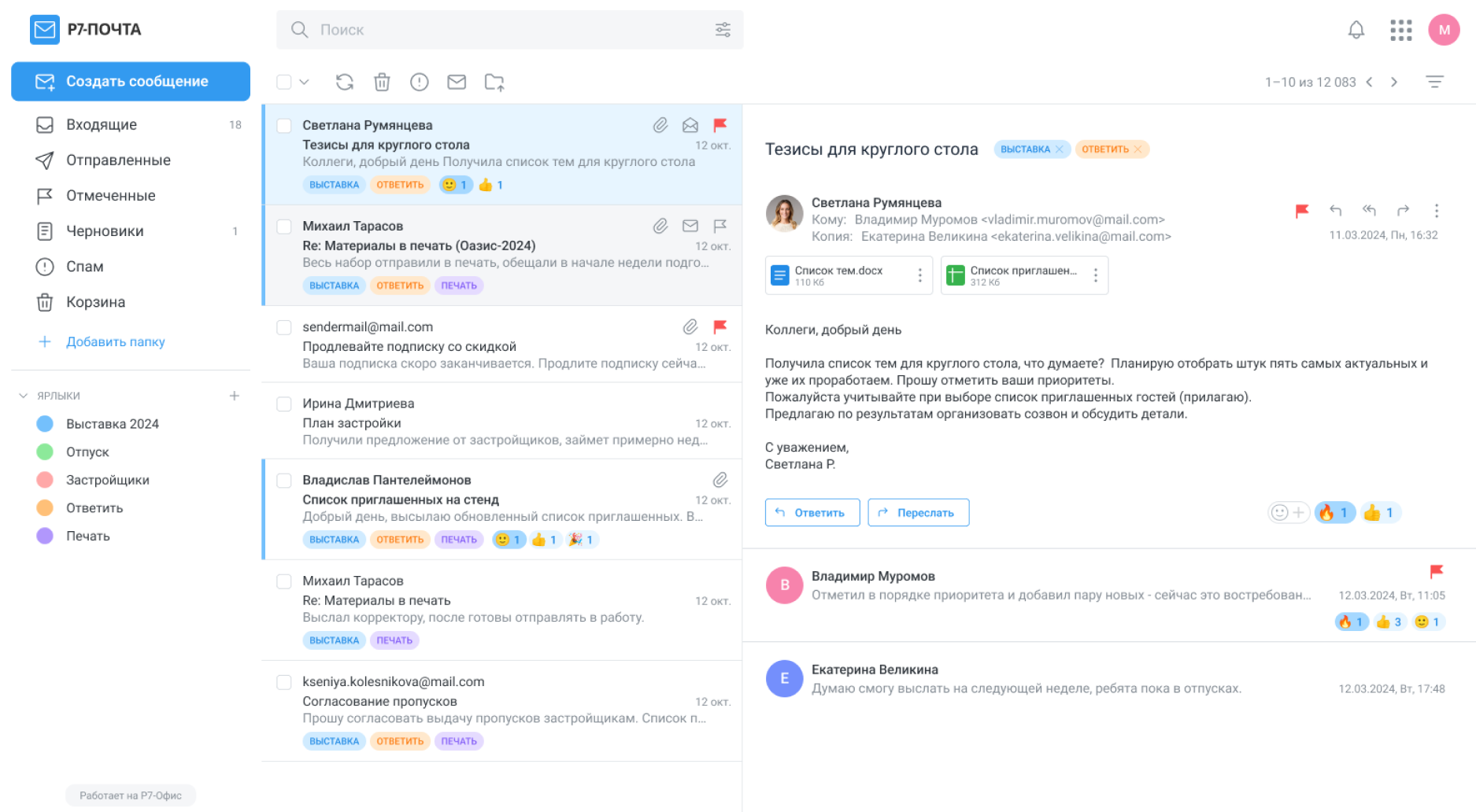
IMAP, SMTP, POP3, CalDAV, CardDAV, LDAP, and iCal ensure stable synchronization of mail, calendars, and contacts across any infrastructure.
Users can create and manage folders, reorganize how their mail is stored, and set a preferred display view — making it easy to keep the inbox clean and find messages quickly.
Automated rules sort incoming messages into folders, apply categories, and cut through the noise. Important messages are highlighted with labels and pinned to the top of the list.
Corporate signatures are applied automatically. Auto-reply and rule-based forwarding keep communication workflows running smoothly without manual intervention.
Users can see whether a recipient has read their message and flag messages as important — helping them stay on top of key threads and prioritize their work.
The built-in calendar lets users create events, schedule meetings, and view their agenda in flexible layouts. Guest invitations with RSVP responses and shared calendar access are fully supported.
Organization-wide shared contacts, personal lists, favorite cards, and any additional entries users maintain for their own work — all in one place. Search, grouping, and a clear structure make it easy to find the right person quickly and keep things organized, even in large teams.
Support for IMAP, SMTP, and POP3 mail protocols.
CalDAV, CardDAV, LDAP, and iCal protocols — for syncing calendars, contacts, and address books.
Attachment preview: PDFs and documents open directly in the mail client — no download required.
Navigation and color labels — for easy email sorting and inbox organization.
Custom folders, external recipient warnings, and control over critical workflows.
Full Exchange Web Services synchronization — for fast migration to R7.
PST archive import — transfer data from Outlook with conversion to MBOX format.
Delegated mailboxes — access to colleagues’ mailboxes for assistants and managers.
Meeting scheduling — view participant availability and coordinate meeting times.
Advanced calendar features — event updates, forwarding, and attachments.

The mail client performs reliably under heavy load and handles daily peak traffic without issue.




You’ll get a hands-on look at formatting, document comparison, automation, and spell-check features applied to real-world business scenarios.
Our solution is compatible with all Russian operating systems and supports all the protocols you need: IMAP, SMTP, POP3, CalDAV, CardDAV, and LDAP.
The product also meets the requirements of corporate and government sectors and is suitable for deployment in infrastructures with elevated security requirements.
Yes. Mobile mail clients are supported via standard protocols. Employees can use email on iOS, Android, and Desktop without any limitations.
Yes, the platform complies with regulatory requirements and other corporate information security standards. The solution is listed in the Unified Register of Russian Software and is recommended for deployment in government and commercial infrastructures.

This website uses cookies to improve site performance, analyze traffic, and personalize content.
Technical cookies required for the website to function. These cannot be disabled.
Help us understand how you use the website so we can improve it.
Used to display relevant ads and measure campaign effectiveness.