The unified communications
platform Messenger & Video Calls

Communication and work in one secure application. Chats, calls, video conferencing, channels, statuses, and documents — all within your organization’s closed environment.
Windows
macOS
Linux
In Browser
Communication

Every type of communication
in one place

Security

Security and Access Control

1
Enterprise-grade protection

Security policies let you restrict message forwarding and copying, block screenshots, manage guest access and expiration settings. Sensitive channels support additional authentication.


2
Unified authentication

Supports SSO, Kerberos, and SAML 2.0 login standards, as well as two-factor authentication. Integration with corporate user directories and ESIA (Russia’s unified identification and authentication system) is available.


3
Flexible roles and permissions

Access to reading, publishing, calls, recordings, and exports is managed centrally by department and project. All user and administrator actions are logged, ensuring full auditability and compliance with information security requirements.


Collaboration

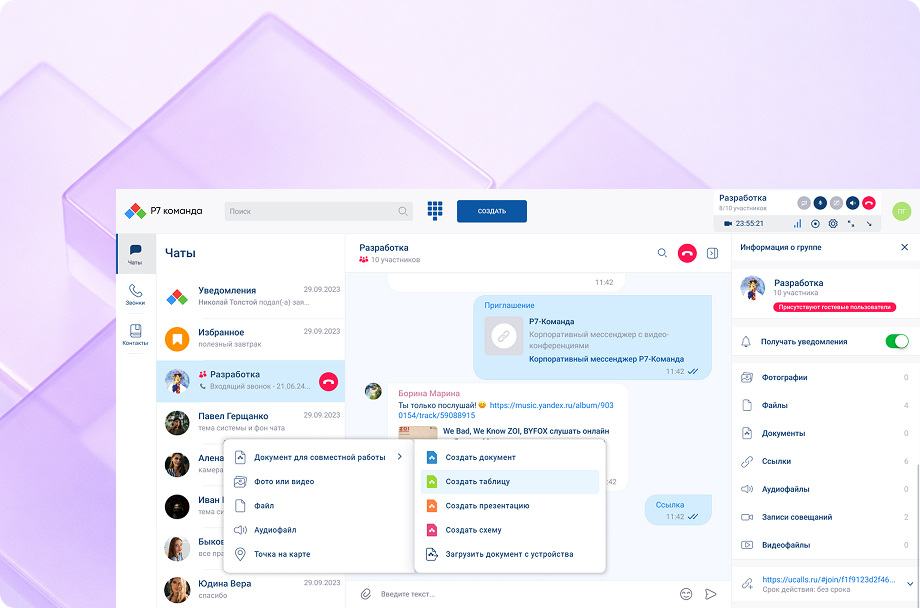
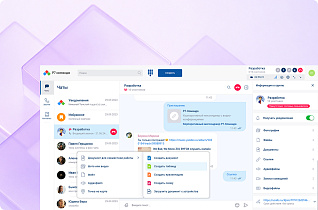
Work with documents directly in Messenger & Video Calls

Open, edit, and approve files without switching to third-party apps — right where the conversation is happening.

Documents from R7 Drive are accessible in chat, version history is preserved, and permissions are inherited from storage.

Open, edit, and approve files without switching to third-party apps — right where the conversation is happening.

Documents from R7 Drive are accessible in chat, version history is preserved, and permissions are inherited from storage.


Administration

Built for administrators

A single management console for users, groups, and policies.
Configure permissions, quotas, and restrictions for chats and channels.
Reports and analytics on messages, calls, and employee activity.
Interface branding: logo, themes, stickers, and elements aligned with your corporate identity.

Deployment and pilot options

1
Install as part of R7 Corporate Server

On-premises installation on company servers with full data isolation. Ideal for organizations with high security requirements.

Deployment in an isolated corporate cloud with network segmentation, custom access policies, encryption, and monitoring.

2
Demo without installation

Try the cloud version to explore the service with your own use cases: chats, conferences, documents, administration. At the end of the trial, migration with full data retention is available.

Partners

Proven at scale in production environments

R7 Office is already running inside the software ecosystems of major Russian corporations and partner infrastructures, handling high traffic volumes and millions of active users every day.



Cross-platform

Cross-platform without compromise

1
Available on all devices

On Desktop and mobile, it functions as a full-featured solution. When accessed via browser, video conferencing and chat features are available.


2
Flexible deployment

Deploy in the cloud, on your own servers, or in an air-gapped environment. The editor adapts easily to any infrastructure and corporate security policies.


Request a Consultation and Demo

Get in touch

We’ll tailor the Messenger & Video Calls platform configuration to your organization’s scale and security requirements. We’ll walk you through a demo using your own scenarios, then propose an optimal deployment plan for your corporate environment.
Request a Callback

You’ll get a hands-on look at formatting, document comparison, automation, and spell-check features applied to real-world business scenarios.
By clicking “Submit”, you accept our Terms of Use and Privacy Policy. You confirm your consent to personal data processing.