Submit your request, and our specialists will contact you shortly.
Submit your request, and our specialists will contact you shortly.
Submit your request, and our specialists will contact you shortly.
Submit your request, and our specialists will contact you shortly.
Submit your request, and our specialists will contact you shortly.
You can review the methodology and training program for "Corporate Server 2024" via the link
We regularly update our product and share the news. Subscribe to our newsletter to stay up to date with the latest developments in the R7 Office environment.

Employees can work with files while traveling, on-site visits, or in locations with poor internet connectivity.
The folders they need stay on their computer, independent of server connection stability.
No more sending files by email or messenger, storing them on a flash drive, or duplicating them across multiple services.
File Express automatically pushes changes to where they need to be and records the result.
When a document is edited on multiple devices, conflicts and “final-edits” file versions start piling up.
File Express creates a backup of the file, so you never lose your work.

Employees work with local folders, and automatically synchronizies changes once the connection is restored.
Ensures data consistency across branches and data centers.
Documents stay on the device, so employees remain productive even without access to the corporate server or a stable internet connection.
Once the connection is reestablished, changes are cleanly pushed to corporate storage.
If you’re planning to move away from external services and switch to a domestic solution, File Express helps you migrate your folder structure and files to R7 Drive without data loss or corruption.
You can maintain a backup in a separate storage location or at another site without changing users’ existing workflows.
IT sets the rules, and users keep working in their own folders.
In the interface, add your corporate storage or server and verify the connection.
The source can reside either within your own infrastructure or in an external cloud as determined by your organization’s policy.
Specify which local folder to sync and choose its target server directory.
For each mapping, define the synchronization mode and rules.
An employee opens documents in a local folder even while offline.
When connectivity is restored, File Express syncs the changes to the server and pulls down any updates.
R7 Drive and cloud-based R7 Workspace are both supported.
This is the baseline setup for corporate infrastructure, where storage and access are governed by the organization’s internal policies.
File Express works with WebDAV, FTP, FTPS, SFTP, and SMB protocols.
This enables connections to corporate file resources and partner infrastructure.
S3-compatible services are supported — AWS, MinIO, and others.
Corporate platforms NextCloud and OwnCloud.
Public cloud services — Yandex.Disk, Mail.ru Cloud, Dropbox, Google Drive, and OneDrive.
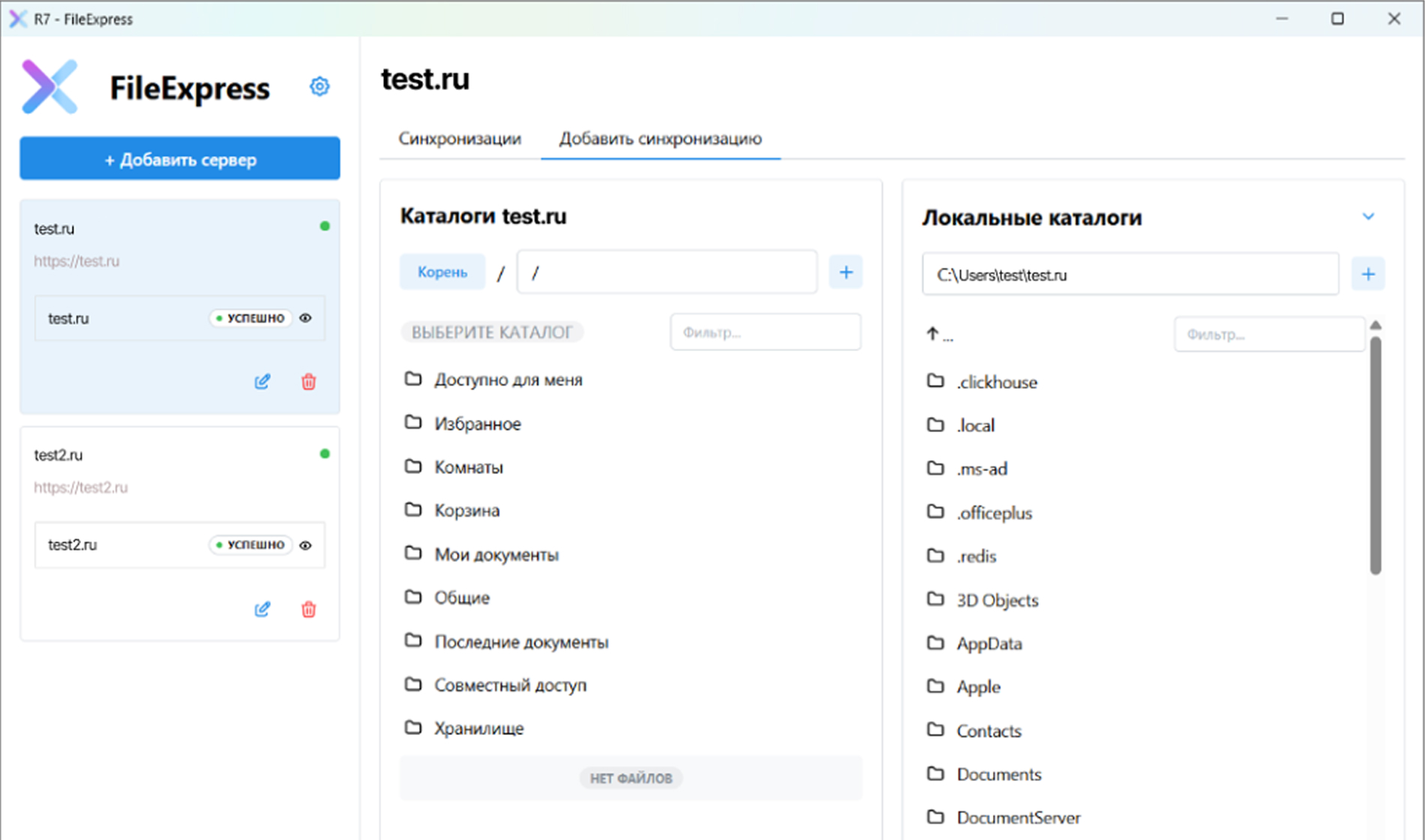
The graphical interface lets you quickly add a server, configure mappings, and manage sync.
Status is visible immediately: what’s syncing, when the last successful operation ran, and where any errors occurred.
The application includes a command-line interface for automation and advanced use cases.
Copy, sync, and bidirectional sync commands are all supported.
File Express maintains detailed operation logs and displays sync progress in real time.
This makes it easy to investigate incidents, verify that transfers completed correctly, and confirm completed operations.
Multiple interface languages are supported, including Russian.
This simplifies deployment across distributed teams and reduces the learning curve for end users.
The application can launch automatically and run in the background.
The system tray icon lets you quickly check the synchronization status.
File Express detects local file changes and transfers only what has changed.
If a file is renamed or moved, File Express won’t re-upload it from scratch.
Syncing is supported for files of any size, deeply nested directories, and filenames containing Unicode characters.
This means real-world corporate archives and legacy data structures can be handled without restrictions.
R7 Drive and cloud services use OAuth 2.0 authorization. The application operates via access tokens and does not require storing storage passwords.
File Express is an application bundled with R7 Corporate Server that works in conjunction with R7 Drive.
The application uses the same authentication mechanisms and access policies already in place at your organization.
On request, we run a live demo using your data and in your infrastructure: we walk through offline access, bidirectional sync, storage migration, and conflict resolution — and configure a pilot scenario tailored to your needs.
After the pilot, you can roll out the solution across the entire organization with the same sync and access rules.

You’ll get a hands-on look at formatting, document comparison, automation, and spell-check features applied to real-world business scenarios.
Yes, if the required folders have been synced to a local directory. In offline mode, employees open and edit files on their computer just like any regular folder. When the connection is restored, File Express uploads the changes made on the employee’s side to the server.
File Express will detect the conflict. If the newer version is on the computer, it will upload that version to the server. If the newer version is on the server, it will replace the local file — but will keep a copy of the local version so any changes can be carried over.
Yes. You can configure a mapping between two remote sources and sync data directly between them — for example, between two corporate sites or between an external cloud and R7 Drive.
This scenario is commonly used for backup and data replication between branch offices. The process is fully manageable: you can monitor statuses, review logs, and track errors.
Yes, File Express includes a CLI. It’s designed for situations where sync and migration tasks need to be integrated into IT workflows — running on a schedule, executing batch operations, automating transfers, or incorporating processes into scripts and maintenance procedures.
The graphical interface is well suited for administrators and end users, while the CLI is built for complex scenarios and automation.
For full enterprise use, you need R7 Drive and the document editors included in Corporate Server. In this configuration, File Express provides offline file access, sync with corporate storage, and seamless document handling when switching between local mode and co-editing.
You can also connect any third-party sources: WebDAV, FTP/FTPS, SFTP, SMB; S3-compatible services — AWS, Minio, or others; NextCloud, OwnCloud; and public clouds — Yandex Disk, Mail.ru Cloud, Dropbox, Google Drive, and OneDrive.
This website uses cookies to improve site performance, analyze traffic, and personalize content.
Technical cookies required for the website to function. These cannot be disabled.
Help us understand how you use the website so we can improve it.
Used to display relevant ads and measure campaign effectiveness.